

The Software Works. Does It Work for the Business?
Strategic Operations / Systems & Engineering
8–10 minutes
The Software Works. Does It Work for the Business?
A business commissions a client portal. Customers can log in, upload documents, and view progress. The project meets its feature checklist, and the application goes live. Then the team discovers that every uploaded file must be downloaded, renamed, and forwarded to another department before anyone can use it. The portal works. The business still has much of the same administrative work.
That example is hypothetical, but the underlying situation is familiar: a technology project can satisfy its technical requirements while overlooking the process it was intended to improve. The missing detail is often an understanding of what happens before and after someone uses the software.
KEY TAKEAWAYS

- A working feature does not necessarily solve the operating problem behind the request.
- Industry context, role responsibilities, decision rights, and handoffs should shape requirements before development begins.
- A shared platform may need different dashboards and permissions for sales, management, finance, and external partners.
- Security, documentation, testing, and client ownership help protect the investment after launch.
- The right solution may be a smaller workflow improvement or integration rather than a major new application.

The question behind the feature request
A request such as “we need a dashboard for approvals” sounds specific enough to begin a design. But the word approval can mean different things inside the same company:
- A salesperson may request a discount.
- A sales manager may approve the commercial terms.
- Finance may approve a payment.
- An operations manager may authorize production to begin.
Those decisions are related, but they aren't interchangeable. Each may have different evidence requirements, thresholds, responsibilities, and consequences.
Before deciding how the dashboard works, someone needs to understand the real sequence of events.
1. Start with how the work actually happens
An operating process has a beginning, an end, and people or systems responsible for what happens between them. Ask the team to describe a real transaction rather than a perfect procedure. What happens when a customer requests a quote? Who prepares it? Which information is needed? What changes when the quote includes an exception? How does the final decision reach accounting or the production team?
The answers may differ from the original process documentation. That doesn't automatically mean anyone is doing something wrong. Businesses adapt as customer needs, staffing, and work volume change.
Understanding the current work gives the development team a more reliable starting point than a list of desired screens.
2. Industry knowledge changes the questions
A construction company, manufacturing business, and professional services firm may all need project management, approvals, and customer records. But the words they use and the decisions they make can carry very different obligations.
In construction, an estimate, an approved change order, and a subcontract commitment are not the same record. For a manufacturer, a product specification revision may affect quoting, procurement, and the work performed on the shop floor. In a professional practice, client confidentiality can determine who may see a document or discussion.
A developer doesn't have to begin as an expert in every industry. The project does need a disciplined way to discover and validate these distinctions with the people responsible for the work. A strong requirements conversation often includes the exceptions: the unusual customer, a disputed price, a missing document, an employee on leave, or an approval that arrives too late.
The exceptional cases reveal important parts of how a business really operates.
3. The same information can require very different views
Imagine a company with a sales team, department managers, and finance staff working on the same deals. For example:
- Salespeople may want to see active opportunities, approved product references, quoted prices, earned commissions, and possible future earnings. That visibility can help them prepare for customer conversations and understand their own pipeline.
- Management may need team performance, exceptions, sales forecasts, and pending approvals. Finance may need payable amounts, calculation evidence, payment status, and reconciliations.
It is common to design these role-specific experiences around shared underlying records while maintaining appropriate access controls. It may also be appropriate to leave certain information in established accounting software and integrate only what the other roles need.
Good software respects how people work without showing everyone everything.
4. Follow the handoffs, not just the screens
A new feature might save time for the person using it and create extra work for someone else downstream. For example, a customer-facing document uploader may be convenient for customers. If the uploaded records arrive without project identifiers, version information, or an assigned reviewer, the office team may still have to sort them manually. A practical design review asks:
- What information enters this step?
- Where is the authoritative record stored?
- Who performs or approves the next action?
- How are exceptions handled?
- What should happen when the responsible person is unavailable?
- What evidence must remain available afterward?
These details determine whether the system supports a complete workflow or merely makes one task more attractive.
5. Don't confuse automating a process with improving it
Custom development can automate existing habits very effectively. That includes unnecessary ones. A company may have added several approval steps years ago, when a particular manager handled every exception. Automating those approvals without reviewing their purpose could preserve a bottleneck indefinitely.
The better approach is to understand why each step exists and whether it still provides value. Some steps may be legally or commercially necessary. Others may be duplicated or obsolete.
Operational analysis helps determine what should be retained, simplified, or redesigned before implementation begins.

6. Security and governance are operating requirements
When software handles company information, customer records, financial details, or approvals, security belongs in the requirements conversation.
The system needs appropriate rules for access, permission changes, audit history, backups, and recovery. A salesperson leaving the company should not retain access to customer records simply because their account still exists. An employee changing roles should receive the new access appropriate to that role, with unnecessary old privileges reviewed.
Governance also covers how the development work itself is controlled. Requirements need clear approval. Engineering changes need review and testing. Decisions and handoffs should be documented so later developers can understand what was built and why.
These controls are valuable even for modest internal applications.
When off-the-shelf tools create more work than they solve, EmberNova Digital designs and builds custom software, internal applications, client portals, and SaaS products around the way the business actually operates.
From an internal tool that replaces a fragile spreadsheet to software built for customers, the work starts with the problem, not the code.
7. A business should know what it is buying and what it will own
Businesses often compare custom software with subscriptions as though the only question were the monthly license fee.
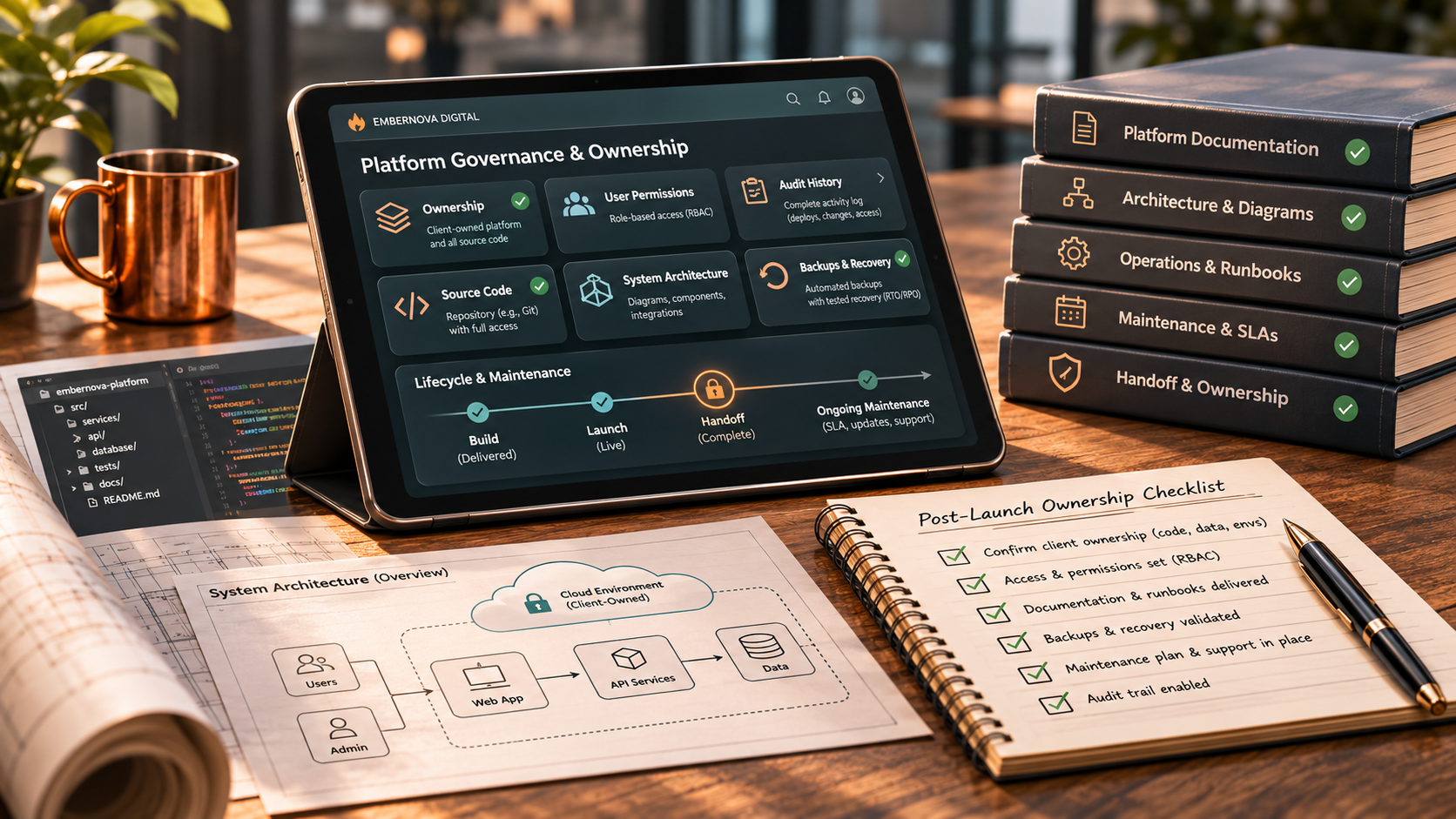
Ownership is more complicated. A client agreement should clarify intellectual property rights, source-code access, data ownership, administrative control, hosting, third-party licenses, documentation, and ongoing maintenance responsibilities.
Owning a custom application does not eliminate cloud hosting, security updates, external services, or future development costs. It can, however, provide more control over the application and the ability to maintain it through qualified professionals under the agreed terms.
A sensible project should leave the business with a clear picture of how it can operate the system after launch.
Related reading:
Custom Software or Another Subscription? How to Decide.
8. Not every operating problem needs custom software
Sometimes the best solution already exists inside a platform the business owns or licenses. A CRM may be capable of routing inquiries automatically. A project-management tool may support approval rules. A document system may already provide version control and appropriate access restrictions.
Other requirements may justify a focused integration or a small internal tool. More complex or distinctive workflows may warrant an owned application or a larger platform.
The deciding question is what creates the right amount of value without adding unnecessary maintenance and operational burden.
Explore
Automation & Business Systems
or
Custom Software, Apps & SaaS.
9. Design for the people who will actually use it
A feature may look excellent in a design review and still be awkward during a busy workday:
- A field employee may use the application on a phone, with intermittent connectivity.
- A salesperson may need fast access to current product information during a customer conversation.
- A finance employee may need to trace how a commission amount was calculated.
- A manager may need to approve an exception without losing the surrounding context.
Those differences affect navigation, permissions, mobile behavior, accessibility, explanations, and the amount of information shown at once. The people doing the work should be included in discovery and appropriate testing.
A successful demonstration to an owner does not necessarily establish that the workflow is practical for the entire team.
10. Treat handover as part of delivery
A software project continues to matter after the developers finish their work. Someone needs to maintain the application, manage authorized users, address security advisories, review integrations, and make future changes.
Documenting the environment and the reasons for major technical decisions makes future maintenance easier. It also reduces dependence on the original developer, especially when the business changes staff or service providers.
A reliable handover can include current requirements, architecture documentation appropriate to the project's size, administrative controls, test evidence, dependency information, deployment instructions, and practical user guidance.
The exact deliverables should match the complexity and risk of the system.
What this means for your business
If you're preparing a website or custom application project, start by describing one or two real tasks the software needs to support from beginning to end. Include who performs each step, which information they use, what happens when something is unusual, and what the next person needs to do their job.
Then compare the possible technology solutions against those requirements. You may discover that an existing system can be configured or integrated. You may find a compelling case for custom development.
Either outcome is useful when it is supported by the company's operating needs.
“Knowing how the work moves through a business changes what you ask software to do.”
- RACHEL CROW, FOUNDER, EMBERNOVA DIGITAL
Strategic Operations & Systems Engineering
EmberNova Digital combines operational analysis with software and systems development. Engagements can include workflow discovery, integrations, automation, role-based applications, customer or partner portals, and broader digital infrastructure projects.
The approach begins with understanding the business's requirements and follows through into governed implementation, testing, documentation, and handoff.
If your company is considering a technology project,
explore our Systems & Engineering services or
discuss the project with EmberNova Digital.